Your resource from @the.agi.guide
The AI decay curve skill files
The resource promised in the video when you commented memory.
Your files
Download the resource
The guide
The full resource
your two resources from the video ↓
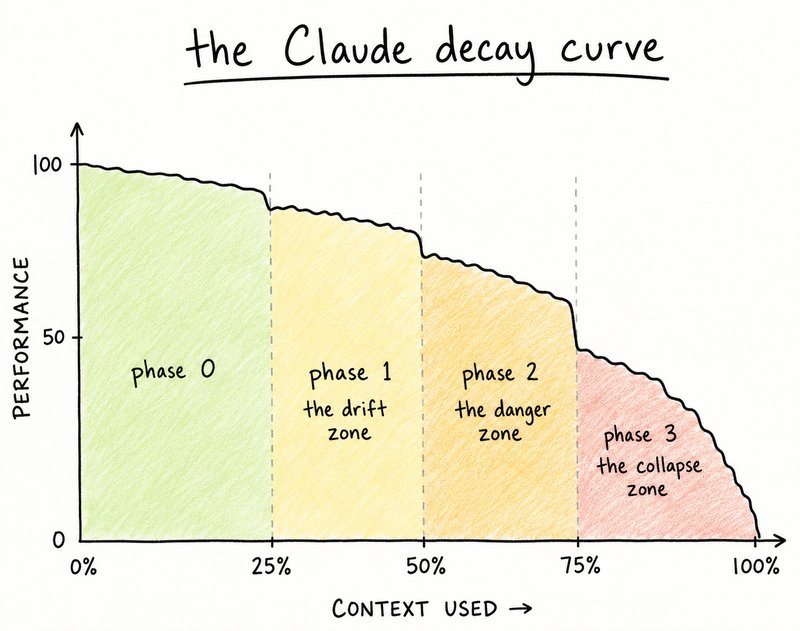
If you watched the video, you already know — every conversation with Claude has a context window, and once it fills up, things start to get messy.
Below are the two things I promised: how to lighten the load on heavy files before you upload them, and a tool that lets you carry your conversation's context into a brand new chat without losing anything.
A free, open-source tool from Microsoft that converts heavy files — PDFs, PowerPoints, Excel files, images — into lightweight markdown before you hand them to Claude. Less file weight in the conversation means more room for Claude to actually think.
Install it
openskills install K-Dense-AI/claude-scientific-skills
This grabs the MarkItDown skill (Security Grade A) and adds it to Claude. Works with Claude Desktop, the CLI, the API, and MCP.
What it handles
PDF, DOCX, PPTX, XLSX, images (with OCR), audio (with transcription), HTML, CSV, JSON, XML, ZIP, YouTube links, EPUBs, and more — all converted down to clean markdown.
Using it
Once installed, just hand Claude the file or ask it to convert something. Claude will use the skill automatically — no need to run commands yourself.
Don't have openskills yet?
The page has install instructions, plus the full SKILL.md and source files if you want to look under the hood before installing.
Full docs and the security scan breakdown are on the page linked above.
A Claude skill that reads back through your entire conversation and compresses it into a clean, structured doc — your goal, what's been decided, what's been built, and what's still open. Paste it into a new chat and Claude picks up exactly where you left off.
If you're on Claude.ai
• Open the doc above and copy everything inside it
• Paste it into Claude as a message — something like "save this as a skill called conversation-handoff"
• From then on, Claude will know how to use it whenever you ask
When a conversation's gotten long, just say "create a handoff" or "I'm running low on context, summarize this for a new chat." Claude will hand you back a structured document — paste that as the first message in a fresh chat and you're back up to speed instantly.
Keep exploring